
3D Q-Version Weather Card for Urban Landmarks
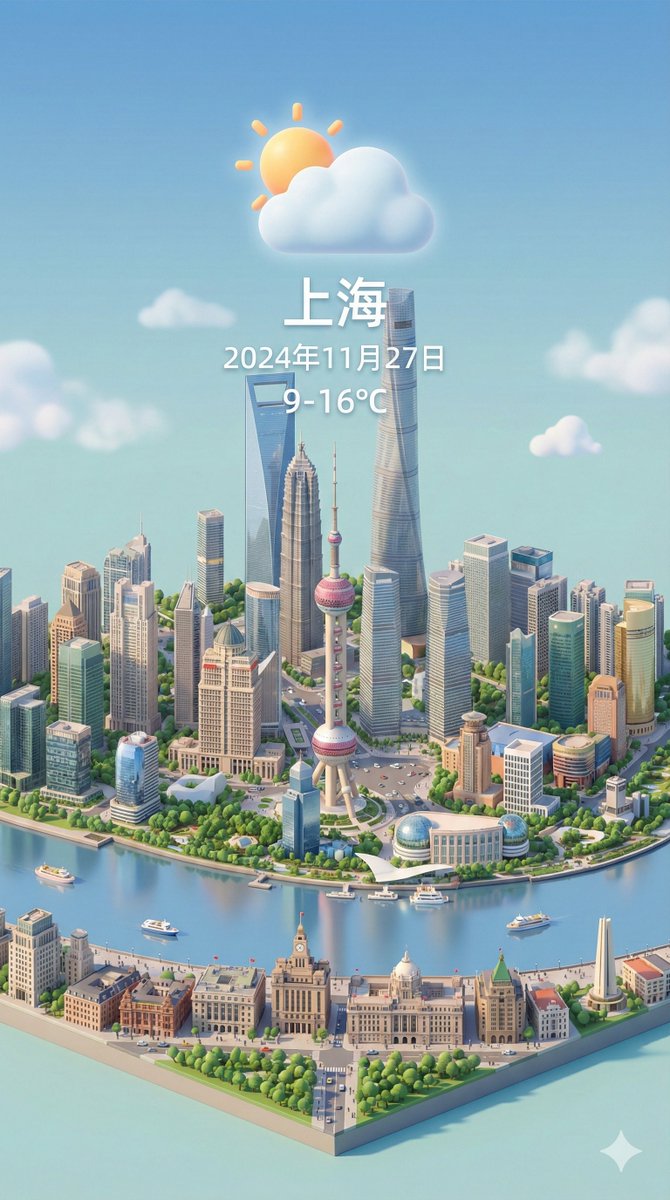
The prompt requires a 3D Q-version miniature scene of urban landmarks presented from a 45° overhead view. The image should be in a vertical 9:16 format and incorporate dynamic weather elements, necessitating an internet connection to retrieve the current weather information for the specified city. - The perspective should be a clear 45° isometric composition, with buildings centered to highlight the three-dimensionality and detailed beauty of the miniature model. - The image should be in a vertical 9:16 format, with PBR material representation and soft, realistic lighting and shadows. - Weather elements must interact with the urban landscape, creating an immersive weather atmosphere. - The background should feature a solid, soft color tone, maintaining a simple and unified overall look. - The city name should be displayed prominently at the top center (in large font), with a weather icon below it, followed by the date (in very small font) and temperature range (in medium font). - Weather information should not have an independent background and can overlap with the buildings, with the text language matching the input city's language. - The prompt explicitly requires an internet connection to retrieve the current weather for the specified city before rendering (example cities include Chicago and Shanghai).
Key insights
Visual and Material Standards: 45° Isometric and PBR Quality
The prompt requires the use of a 45° overhead isometric perspective to present a vertically centered (9:16) composition of miniature urban landmarks, emphasizing fine three-dimensional modeling and warm PBR material representation, complemented by soft and realistic lighting effects to highlight the texture and details of the miniature model.
Dynamic Integration of Weather and Urban Landscape
The prompt instructs to cleverly integrate dynamic weather elements into the buildings and urban landscape, allowing the weather effects to interact with the scene and enhance immersion, while maintaining a simple overall composition. The weather icon should be positioned at the top center of the image, with the date and temperature below it, and the weather information can visually overlap with the buildings.
Real-Time Weather and Localization Text Requirements
The prompt explicitly requires an internet connection to retrieve the current weather for the specified city before rendering, and the text language must be consistent with the local language of the input city (examples given are Chicago and Shanghai), ensuring localized presentation of the weather text and city name.