
AI Development Tools and Optimization of Coding Workflows (Copilot / Terminal / Adversarial Testing)
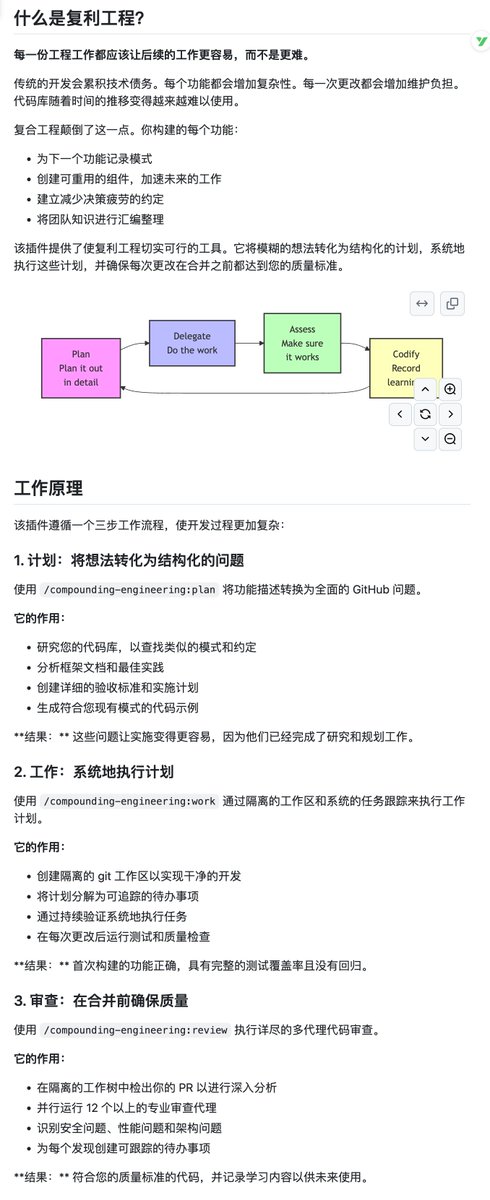
Multiple engineering projects and research indicate that streamlining toolsets, embedding guided routing, and employing adversarial testing can enhance the accuracy and efficiency of AI-assisted programming.
Key insights
Streamlined Toolset Enhances Copilot's Speed and Success Rate
GitHub Copilot utilizes embedded guided tool routing and adaptive tool clustering to reduce the default toolset from 40 to 13 core tools. As a result, benchmark tests show an increase in task success rates by 2-5 percentage points, a reduction in response latency by approximately 400 milliseconds, and improved tool coverage and cache hit rates.
Engineering Workflows and Parallel Reviews Mitigate Technical Debt in AI-Generated Code
The Compounding Engineering Plugin proposes a Plan-Work-Review process, generating detailed issues during the Plan phase, using isolated Worktrees in the Work phase, and conducting parallel reviews by multiple dedicated agents (such as security-sentinel) in the Review phase. This aims to ensure that each AI submission accumulates quality rather than generating technical debt.
Adversarial Testing (InfCode) Enhances Robustness of Automated Patches
The research introduces the InfCode framework, viewing test generation and patch creation as adversarial forces. By continuously generating more challenging tests to compel patch improvements, it achieves quantifiable enhancements in patch quality and coverage on SWE-Bench Verified while reducing regressions.
Terminal Tools and Local Model Integration Reduce Context Switching
Wave Terminal integrates graphical editors, previews, browsers, and AI assistants directly into the terminal, supporting access to local or cloud models. This allows developers to perform operations such as viewing documentation, querying AI, and previewing files within the command line, thereby minimizing the need to switch between the terminal and browser.