
Nano Banana Pro (Gemini 3 Pro Image) User Guide and Examples
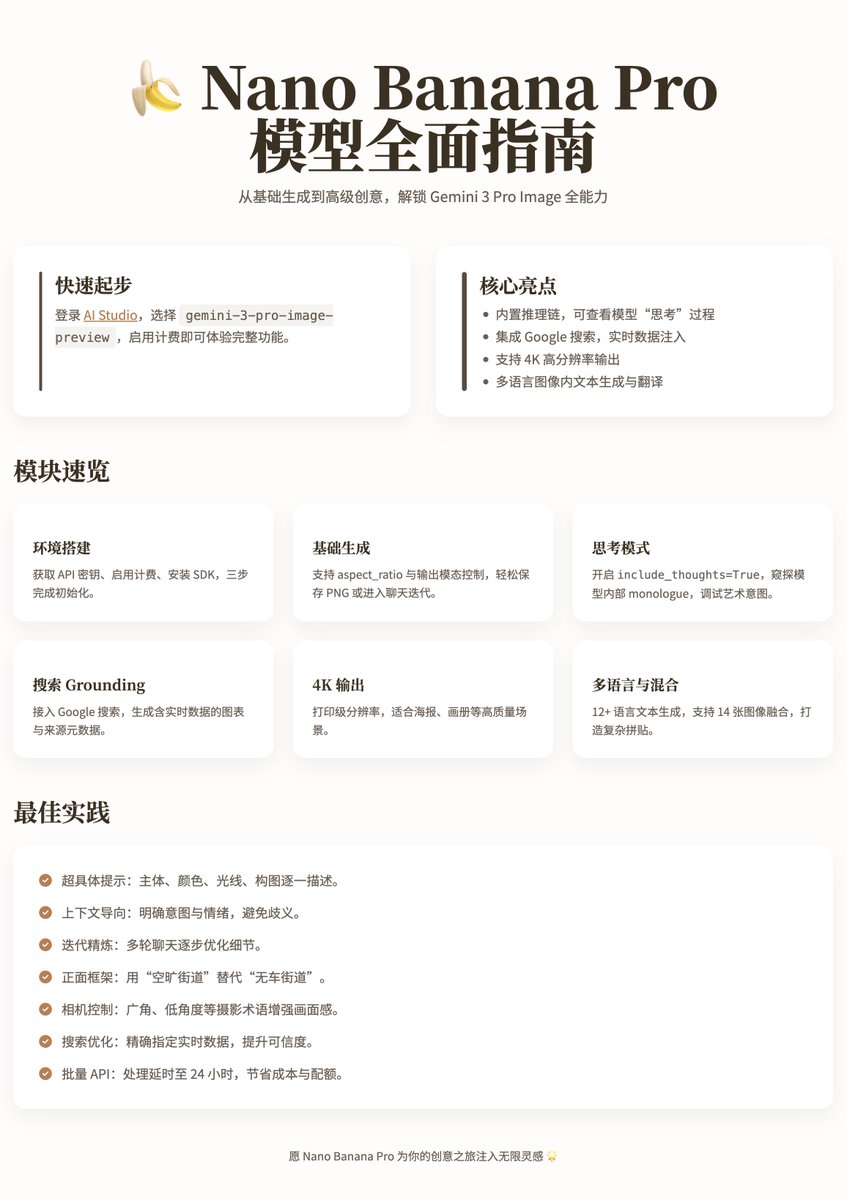
A comprehensive guide and community examples for using Nano Banana Pro, covering environment setup, API, thinking chains, real-time retrieval, and high-resolution output. The guide is divided into 11 modules aimed at developers and serious creators. Use model ID: gemini-3-pro-image-preview in Google AI Studio playground. The Pro version has no free tier and requires billing activation and an API key. SDK installation examples: Python pip install -U google-genai Pillow; JS npm install @google/genai. Client initialization example: genai.Client(api_key="YOUR_API_KEY"). Basic generation supports image/text generation, aspect ratio, and saving as PNG. A chat mode is provided for multi-turn iterations and image editing. The Pro version includes a built-in 'thinking' module: thinking_config=types.ThinkingConfig(include_thoughts=True). It supports search grounding (tools=[{"google_search":{}}]) to inject real-time data and display source metadata. High-resolution output supports 1K/2K/4K (image_size="4K"), suitable for print-level output. It supports text generation and translation in 12+ languages (multilingual workflow examples). Advanced image blending can merge up to 14 images (Flash mode only 3), with high-fidelity character suggestions limited to 5 images. Pro-exclusive examples include pixel art, complex text integration, Broadway mockups, and other high-creative applications. Best practices and tips are detailed (super-specific prompts, context-driven, iterative refinement, photographic terms, etc.). Community examples showcase the realistic effects of Nano Banana Pro, sparking interest online (including 10 examples and prompts).
Key insights
Comprehensive Tutorial: 11 Modules Covering Everything from Basics to Production
The released tutorial breaks down the usage process of Nano Banana Pro into 11 modules, targeting developers and 'serious creators'. The tutorial includes examples and operational instructions from environment setup, API and billing configuration, SDK installation, to client initialization, basic image/text generation, multi-turn chat editing, and production-level best practices. It notes that the Pro version has no free tier and requires enabling Google Cloud billing and using an API key, recommending experimentation in the AI Studio playground before expanding to production applications (supporting direct web app building or remix templates in ai.studio/apps).
API and Client Initialization, SDK Installation Details
The tutorial provides specific engineering preparation steps: logging into AI Studio to obtain the automatically created API key and enabling billing; the Python SDK installation example is pip install -U google-genai Pillow, and for JavaScript, it's npm install @google/genai; the client example code uses genai.Client(api_key="YOUR_API_KEY") and specifies the model ID as 'gemini-3-pro-image-preview'. The documentation suggests checking the latest pricing and being aware of the Pro version's calling costs and quota management (including batch API strategies).
Built-in 'Thinking' Chain (Thinking Mode) Outputs Internal Reasoning
The Pro version supports a built-in reasoning chain (thinking mode), enabled by thinking_config=types.ThinkingConfig(include_thoughts=True). Once enabled, the model first outputs internal thoughts (monologue), and the example illustrates how the model breaks down complex prompts and generates multi-step ideas (e.g., envisioning viral image scenarios), and then generates the final image based on these ideas. The documentation notes that this feature aids in debugging artistic intentions and enhances the accuracy of complex prompts.
Search Grounding: Injecting Real-Time Data and Displaying Source Metadata
The tutorial introduces integrating Google Search as a tool (example tools=[{"google_search":{}}]), allowing the model to access real-time data to generate dynamic visualizations (e.g., a weather map for the next 5 days and clothing suggestions), with outputs including charts and source metadata. The documentation emphasizes that real-time retrieval is suitable for dynamic content and event-related information, and requires that sources are always displayed in the results to ensure transparency and verifiability.
High Resolution and Multi-Image Blending Capabilities Explained
Nano Banana Pro supports multiple high-resolution output levels (1K/2K/4K), allowing specification of image_size="4K" for print-level output, while the tutorial also notes that 4K costs are relatively high. The advanced blending feature allows merging up to 14 input images (Flash mode only 3), and it is recommended to limit high-fidelity character synthesis to 5 images to optimize quality. Examples include workflow descriptions for office group photo collages and complex mockup compositions.
Best Practices, Pro Exclusive Demonstrations, and Community Realistic Examples
The tutorial lists several best practices for prompt words: super-specific prompts, context-driven, iterative refinement, step-by-step instructions, and photographic term control, and provides Pro-exclusive examples (personalized pixel art, complex text integration, Broadway mockups, etc.). Community examples indicate that the realistic effects of Nano Banana Pro have sparked discussions online, listing 10 crazy examples and prompts (including visualized fictional scene examples), showing that the model's performance in realistic synthesis has been widely discussed.