
One-Click PPT Generation and Style Templates with Lovart + Nano Banana Pro
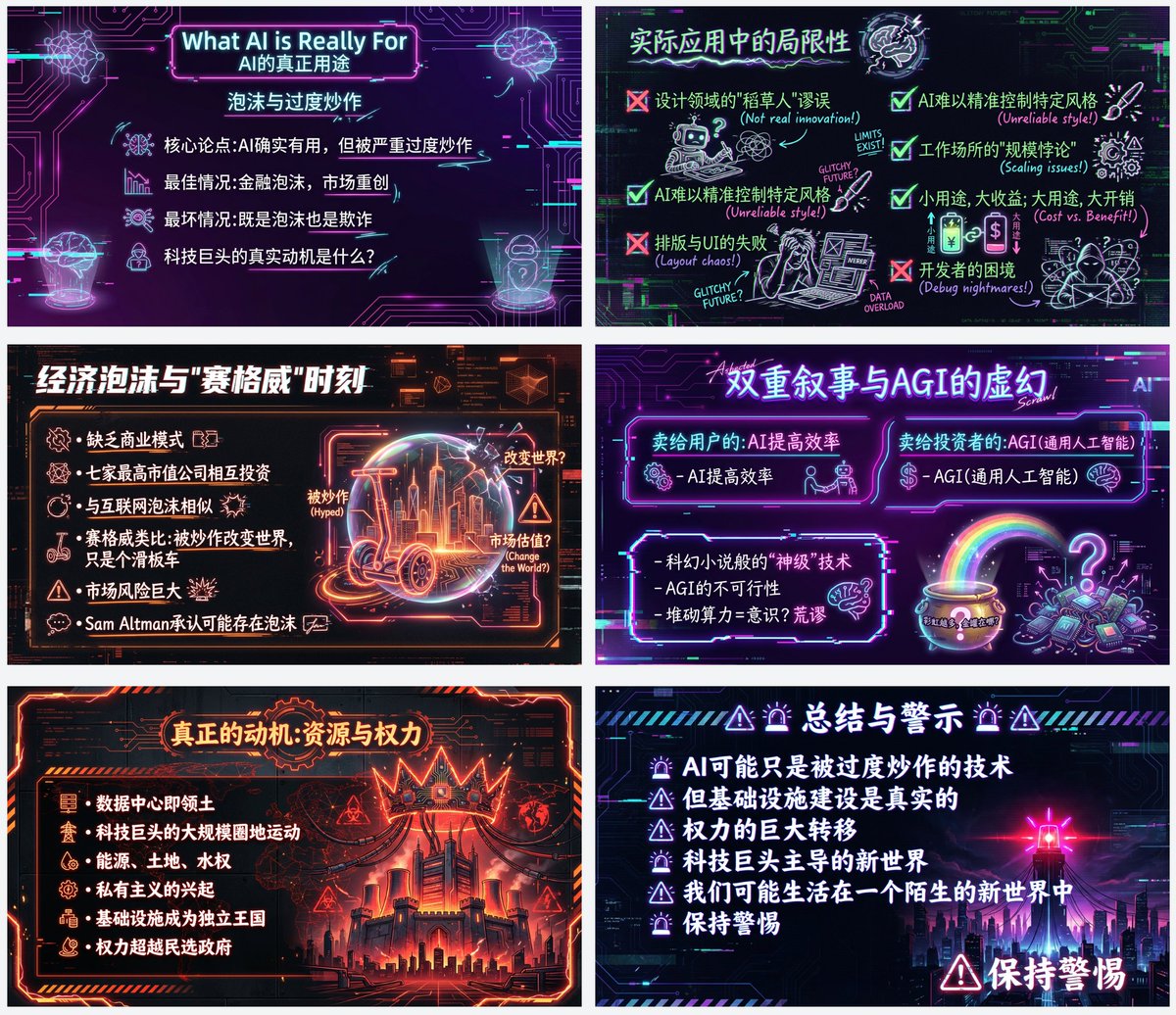
Multiple posts showcase the one-click PPT generation capability and various style templates achieved by Lovart in conjunction with Nano Banana Pro. The author points out that Lovart excels in content disassembly and text processing, achieving a PPT generation function similar to NotebookLM but with enhanced capabilities. The author has organized and published several directly usable prompt templates (cyber hand-drawn, gradient bento box, League of Legends UI, Dieter Rams minimalist, hand-drawn blackboard, etc.). The process involves first generating a PPT outline, then using Nano Banana Pro to generate content page by page, requiring each page to be output separately rather than as a single image; combined with Lovart's canvas feature, it allows for editing of individual pages. The posts also explain Lovart's usage tips: you can specify Nano Banana Pro in the Agent input box by @ model name or use the Image Generator within the canvas to avoid misadjusting other models and consuming credits; the prompt templates retain the placeholder 'Article content: [insert article content here]'.
Key insights
Lovart can replace and surpass NotebookLM's PPT generation process
Multiple posts indicate that Lovart, in conjunction with Nano Banana Pro, can achieve NotebookLM-style one-click PPT generation, while performing better in several aspects. The author emphasizes Lovart's outstanding capabilities in content disassembly and text processing, allowing for the generation of a PPT outline first, followed by page-by-page outputs generated by Nano Banana Pro; the results support page-by-page editing on Lovart's canvas, avoiding a one-time overall output. Related posts include 12938, 12931, 12932, 12933, 12934, 12936.
Multiple reusable PPT style prompt templates have been made public
The author has organized and published several directly usable PPT generation prompt templates, including: cyber hand-drawn/graphic recording style, gradient bento box (Bento grid), League of Legends game UI style, Dieter Rams minimalist style, professor handwriting whiteboard style, etc. Each template includes a generation process description: first write the PPT outline, plan the content for each page, and then hand over to Nano Banana Pro for page-by-page generation, clearly requiring one page per output with consistent style, and the template text retains the placeholder 'Article content: [insert article content here]' for replacement. Related posts include 12931, 12932, 12933, 12934, 12936.
Combining Lovart canvas allows for page-by-page editing to enhance control
Posts repeatedly explain that after importing the content generated by Nano Banana Pro into Lovart's canvas, partial modifications can be made to individual pages, resulting in higher controllability and editability compared to generating an entire image at once. The author believes that this 'generate first, then fine-tune' workflow is superior to NotebookLM's one-time output method and provides basic operational guidance for using the canvas. Related posts include 12938, 12931, 12936.
Usage suggestions to avoid misadjusting models and consuming credits
The author provides specific usage suggestions to avoid misadjusting other models that lead to credit consumption: you can specify the model in the right-side Agent input box (e.g., @Nano Banana Pro) and directly follow with the prompt, or select Image Generator in the floating window on the left side of the canvas to generate images within the canvas to use the target model most reliably. The posts also provide interface screenshots and operational step prompts. Related posts include 12950, 12946, 12948.
Prompt words and process details are clear and suitable for middle school students
Each template prompt clearly specifies the target audience, output structure, and style, such as 'Help me create a PPT based on the following article that middle school students can understand. First write a PPT outline, plan the content for each page, and then generate page by page using Nano Banana Pro, ensuring consistent style, and do not turn the PPT into a single image, generate one page at a time.' These constraints appear repeatedly across multiple templates to ensure output consistency. Related posts include 12931, 12932, 12933, 12934, 12936.